Why IncidentHub's Alerting is Better than Other Status Page Aggregators'


The Alert Fatigue Problem in SaaS Dependent Teams
IncidentHub tracked 48000 SaaS and Cloud outages in 2025. The average organization depends on 100+ SaaS apps, making third-party vendor monitoring a crucial aspect of risk management and business continuity for almost all modern organizations.
Better SaaS outage alerting is about monitoring the right parts of your third-party services, and routing alerts to the right people at the right time.
This article covers the six criteria that separate useful cloud outage alerts from noisy ones, how IncidentHub's alerting works, real-world scenarios where it matters, and who this tool is built for.

- The Alert Fatigue Problem in SaaS Dependent Teams
- Defining Good Third-Party Outage Alerting
- How IncidentHub Delivers Smarter Cloud Outage Alerts
- IncidentHub Monitors Every Service Your Stack Depends On, in One Place
- IncidentHub Alerting Capabilities at a glance
- Three Scenarios Where SaaS Outage Alert Quality Actually Matters
- Is IncidentHub the Right Outage Alert Tool for Your Team?
- Conclusion
- Frequently Asked Questions About SaaS and Cloud Outage Alerts
Defining Good Third-Party Outage Alerting
What is good alerting for cloud and SaaS outages? There are plenty of tools and websites as of this writing which aim to show you the status of third-party services. However, a red or green status icon against a service name does not mean much if you are running a business. Google Cloud is down - but which Google Cloud components and in which zones? This is the bare minimum that a decent SaaS outage alerting tool should start with.
Alert granularity - per-component, not per-service
Monitoring and getting alerts for an entire cloud platform when you use 5 services in 2 of its global zones is the road to alert fatigue.
Good alerting: Being able to choose which components, regions, services, etc. you want to monitor and get alerts for. Component-level filtering ensures you get only relevant alerts.
Alert type filtering - suppress maintenance, mute noise
Many vendor status pages include both maintenance and outage alerts. While maintenance alerts are useful if you want to plan ahead, a lot of them are just noise for your team. Even when filtered through your component-level filtering, maintenance alerts can be too frequent or of no use to you.
The caveat here is that maintenance alerts for some of your services are useful, and some are not.
Good alerting: Being able to enable maintenance alerts for certain services, and turn it off for others.
Lifecycle filtering - start, updates, resolution
Some services are more critical to your business than others. E.g. for an AWS-hosted application in EC2 us-east-2, you would want to be on top of every alert for EC2 incidents in that zone, including when it started, any intermediate updates as the incident progressed, and when it was resolved.
If you use Grafana Cloud for log ingestion, you don't need to receive every alert for an incident. Your team only needs to know if Grafana Cloud is down, and when it is back up, so that they can debug issues.
Good alerting: Being able to choose which lifecycle events you want to receive alerts for.
Plug into existing workflows
Your team is already using a lot of tools. They have invested a significant amount of time to learn the ins and outs, short cuts, caveats of each. Putting another tool into the mix creates unnecessary friction and cognitive load.
Good alerting: Being able to send alerts to tools your team already uses, whether it's chat, email, paging, or a ticketing system.
Context-aware, tool specific alerts
Workflow and communication tools are designed to make communication and collaboration easier through carefully designed interfaces and UX. An alerting tool should be able to adapt to the principles of its target tool when it integrates with one.
Slack automatically collapses large messages, and you can expand to read them fully. Third-party outage alerts can include the complete outage message, including the details, list of affected components, timestamp, link to the status page, link to the incident, and so on because your team is going to use that information to debug issues.
PagerDuty alerts are designed to be indicators, and they are just the initial trigger for an on-call engineer. Alerts either through the PagerDuty app or a phone call trigger a different workflow where the on-call engineer has to look at runbooks, dashboards, and other channels to respond to the incident. PagerDuty alerts for third-party services cannot be too verbose - they should be concise and to the point.
For IT and support teams working with ticketing systems like Zendesk, BoldDesk, and Atlassian Jira Service Management, it's important that there is an alert when a third-party service goes down, and there is no subsequent noise. The purpose of the initial ticket is to inform the team that AWS is down, or MS 365 is down, and leave them alone without sending updates for the same incident, so that they can deal with user tickets. They can always consult the aggregated status page that most aggregators provide to see when the service is back up.
Good alerting: Contextual, tool-aware alerts that are tuned by content and frequency.
Upcoming maintenance alerts
Planning for maintenance is a routine part of your Ops/IT teams, and not just for your internal services. Knowing in advance when your third-party cloud services have maintenance windows is useful to plan for it.
Good alerting: Being able to receive alerts in advance for upcoming maintenance windows.
A status page aggregator is a tool that monitors the official status pages of your third-party services and notifies you when incidents occur - so you don't have to check them manually.
How IncidentHub Delivers Smarter Cloud Outage Alerts
IncidentHub's SaaS outage alerting is designed to be granular, contextual, and tool-aware.
Per-service component filtering
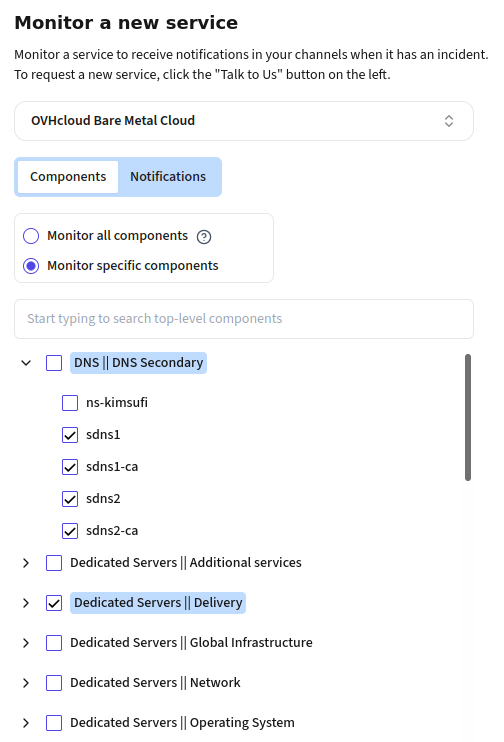
IncidentHub allows you to monitor exactly which components of a third-party service you are interested in. For example, if you are using Google Kubernetes Engine in us-east1 for your application, you can monitor only the Kubernetes service in that region. If your team uses Autotask, monitor only that instead of the entire Kaseya suite.
Incident type filtering
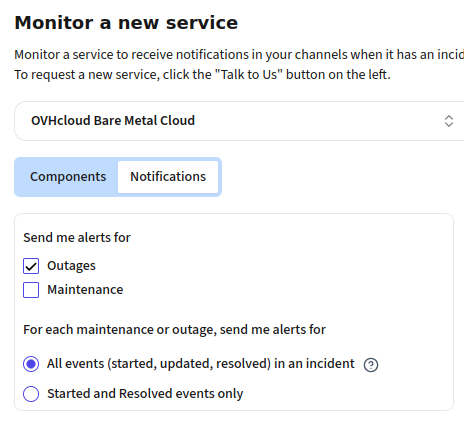
IncidentHub's filtering allows you to turn off maintenance alerts, outage alerts, both, or neither on a per-service basis. This lets you have fine-grained control over each service.
Incident lifecycle filtering
For each vendor that you monitor in IncidentHub, you can turn off intermediate outage updates - meaning that you will receive only start/end alerts for that service's incidents. This applies to all notification channels except ticketing systems.
Typically, vendor updates are sent at incident start, for each official status page update, and at incident resolution. This maps directly to the SRE/on-call workflow: know when to start investigating, stay informed as the vendor responds, know when to close the incident ticket. Most status page aggregators always fire on state change. IncidentHub follows the full narrative and allows you to control this for each service.
Integrates into your existing toolchain
IncidentHub integrates with your existing communication tools. You can send cloud outage alerts to Email (including distribution lists), Slack, Microsoft Teams, and Discord - most commonly used team communication tools. PagerDuty is supported for on-call engineers. You can also hook up alerts to any custom system or dashboard using webhooks.
For your IT and customer support teams, IncidentHub can send alerts to ticketing systems like Zendesk, BoldDesk, Freshdesk, and Atlassian Jira Service Management.
Context-aware, tool specific notifications
IncidentHub's SaaS outage alerts are designed to be contextual and tool-aware. This means that the alerts are formatted to be easy to read and understand by the target tool users.
A Slack, Microsoft Teams, or Discord alert has all the necessary information.
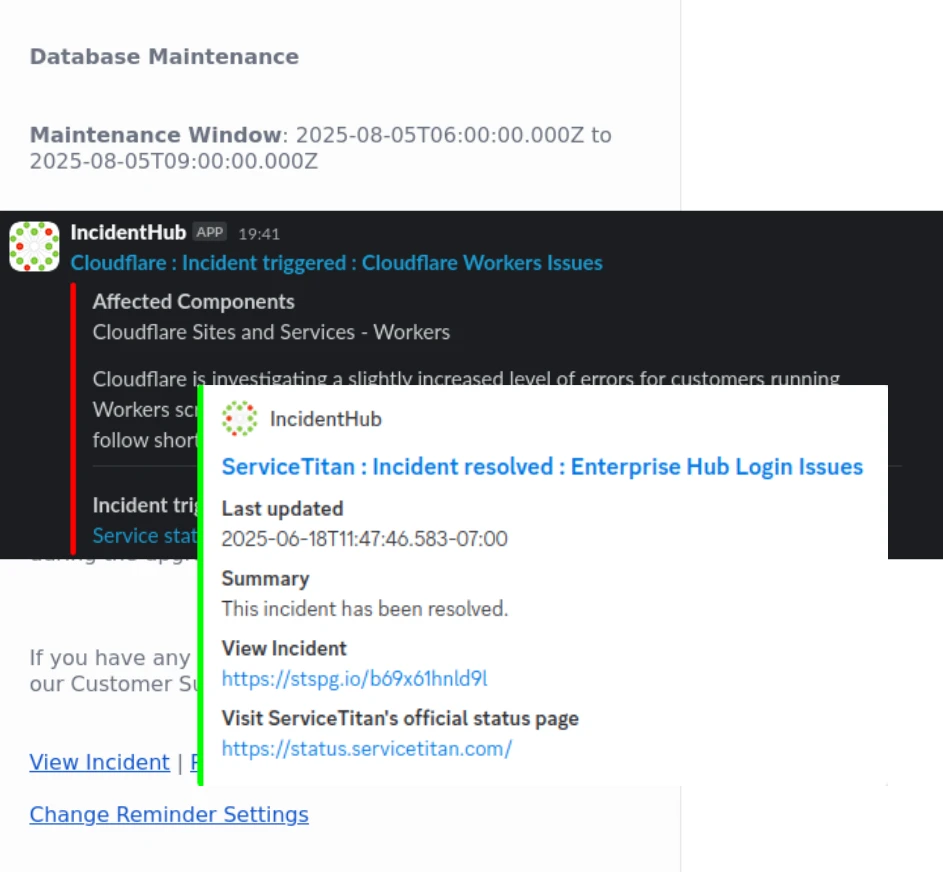
A PagerDuty alert is designed to be a simple indicator, whereas a webhook integration gives you the complete alert payload - and you can choose to filter that out further in your pipeline.
For ticketing systems, IncidentHub sends only the start event for an incident to avoid noise.
Upcoming maintenance reminders
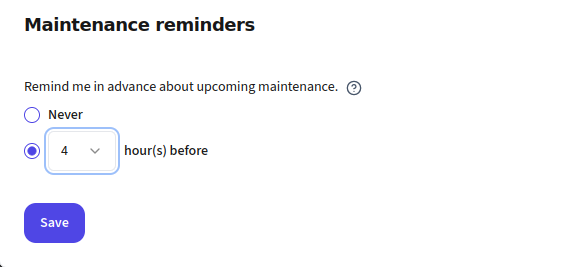
You can plan your internal operations better when you are reminded in advance of upcoming maintenance in your vendors. IncidentHub can send you reminders for upcoming maintenance. You can set the reminder to any time between 1-48 hours before the maintenance.
Bonus: Your components first
Outages and maintenances are filtered against your component filters and only the matched alerts are sent. If the outage/maintenance has other components also in addition to your selected ones, they will show up too in the notification. To avoid confusing the user, IncidentHub bubbles up your chosen components to the top of the alert.
E.g. if you choose Cloudflare Worker and Pages in Cloudflare, and an outage occurs which affects Workers, Pages, and Workers Builds, you will see Workers and Pages at the top of the alert.
Together, these features make IncidentHub's SaaS and Cloud outage alerts better than other status page aggregators because they give you a 360-degree coverage of your third-party dependencies.
IncidentHub Monitors Every Service Your Stack Depends On, in One Place
IncidentHub monitors 950+ services as of this writing, and new ones are being added regularly as well as on request.
Key categories that IncidentHub monitors are:
Cloud Providers
- Amazon Web Services
- Google Cloud Platform
- Microsoft Azure
- DigitalOcean
- Linode
- Hetzner
Payment Gateways
- Stripe
- PayPal
- Paddle
- Cash App
- USAePay
CI/CD and Software Delivery Pipelines
- GitHub Actions
- Jenkins
- CircleCI
- GitLab CI
- Travis CI
Source Control
- GitHub
- GitLab
- Bitbucket
- GitHub Enterprise
Hosted Databases
- MongoDB Atlas
- AWS RDS
- PlanetScale
- Supabase
- Render PostgreSQL
- Aiven
CDN & DNS
- Cloudflare
- AWS CloudFront
- Fastly
- Akamai
- Cloudflare CDN
Observability
- Datadog
- New Relic
- Grafana Cloud
- Honeycomb
- PagerDuty
Artifact Repositories
- Docker Hub
- Google Container Registry
- RedHat
- GitHub
- npmjs
Cyber Security
- Enclave
- Patch My PC
- Abnormal AI
- 1Password
- Kaseya
- Bitwarden
IT Management
- Axcient
- Cisco Meraki
- Commvault
- ManageEngine
- Palo Alto Networks
- Ubiquiti
Communication and Collaboration
- Zoom
- LoopUp
- Docusign
- Microsoft 365
- Google Workspace
- RingCentral
Team Communication
- Slack
- Discord
- Microsoft Teams
- Google Chat
- Zoom
Accounting and Financial Management
- SAP Concur
- Planful
- Zoho Expense
- Brex
Project Management
- Atlassian Jira
- Asana
- Trello
- Monday
- Notion
- Basecamp
Sales and CRM
- Salesforce
- Outreach
- Avoca
- Zoho CRM
- HubSpot
Email Providers
- SendGrid
- Mailgun
- Postmark
- MailerSend
Auth And Identity Management
- Auth0
- Okta
- Clerk
- OneLogin
PSA Tools
- ConnectWise
- Datto Autotask
- HaloPSA
- SuperOps
Backups and DR
- Datto BCDR
- Veeam
- Axcient
- Commvault
Network Monitoring and Management
- Auvik
- LogicMonitor
- Domotz
- Atera
Security Awareness Training
- KnowBe4
- Barracuda PhishLine
- Huntress
- Hoxhunt
Monitoring all of these from a single dashboard, with a unified alert system and per-service component filters, is what makes IncidentHub a true cloud outage alert platform.
Don't see your service? You can request for specific services at our support email (support at incidenthub.cloud).
IncidentHub Alerting Capabilities at a glance
Here's a full breakdown of IncidentHub's SaaS outage alerting capabilities and the problems each one solves:
| Capability | What it solves | Available on free tier? |
|---|---|---|
| Per-service component filters | Choose exactly which parts of a service to monitor - eliminates alerts for regions/services you don't use. | ✓ |
| Maintenance alert toggle | On/off per service - stops planned maintenance from flooding your team. | ✓ |
| Suppressed intermediate updates | Start + end only, or all updates - tunes alert volume to service criticality. | ✓ |
| Slack, Discord | Alerts where your team already works. | ✓ |
| Webhooks, MS Teams, Email | Integrate with your existing team communication tools. | Paid |
| PagerDuty integration | Routes outage alerts into on-call workflows. | Paid |
| Ticketing systems | Connects to your existing ticketing system. | Paid |
| Custom webhooks | Connects to any custom system or dashboard. | Paid |
| Upcoming maintenance reminders | Reminds your team about upcoming maintenance in your vendors. | Paid |
Three Scenarios Where SaaS Outage Alert Quality Actually Matters
The partial Stripe outage
Stripe had an outage but only the Stripe API is affected, not Global Payments. Stripe has the following components:
- Acquirers and payment methods
- Banking-as-a-service
- Global payments
- Revenue and finance automation
- Stripe API
- Stripe core components
A team monitoring all of Stripe gets an alert and panics about checkout. A team monitoring only the components they use knows immediately whether they need to take action or not. No investigation time is wasted.
The maintenance window flood
A team monitors 25 SaaS dependencies, including Cloudflare and Twilio. Cloudflare has regional presence around the globe, and Twilio has integrations with many regional telecom and internet providers. Since maintenance windows are localized to regional units, they occur very frequently, and subscribing to all of them results in a flood of alerts.
As an example, Twilio had 1040 maintenance events and Cloudflare had 820 maintenance events in 2025 (source: IncidentHub monitoring data). If you use Cloudflare and Twilio, your application probably depends on a small subset of these regional units.
If you had subscribed to Cloudflare and Twilio alerts from their status page, or piped their RSS feed into your Slack, you would have received a flood of alerts - which included both outages and maintenance events.
Using maintenance alert toggling in a status page aggregation tool like IncidentHub, you can turn off maintenance alerts completely for Cloudflare and Twilio, while keeping them on for other vendors that you use.
The silent monitoring failure
A vendor switches status page platforms (OpenAI's move is an example). Teams relying on RSS scrapers or brittle, custom monitoring setups silently stop receiving cloud outage alerts - they don't know their monitoring is broken until they miss an incident.
IncidentHub's auto-detection of status page structure changes means monitoring adapts without any manual intervention.
Is IncidentHub the Right Outage Alert Tool for Your Team?
When choosing a SaaS outage alerting tool, you should consider which is right for your team, and not which is the best.
Based on our experience, IncidentHub is a good fit for the following use cases:
- IT teams managing a portfolio of SaaS tools who need early warning without babysitting status pages manually.
- SRE and Ops teams who need cloud outage alerts to flow directly into their on-call workflows (PagerDuty, OpsGenie, custom runbooks) with enough granularity to act immediately.
- Development teams dependent on third-party APIs (Stripe, Twilio, OpenAI) where an upstream outage directly causes customer-facing failures.
- MSPs managing multiple clients, each with their own SaaS stack, who need a single dashboard per client with per-client monitoring configurations.
Conclusion
The difference between good and great SaaS outage alerting is granularity: knowing which component in which service is down, routing only what matters, and doing it the moment an official status page update goes live.
The cost of a missed cloud outage alert is an incident your users feel before your team does. The cost of too many alerts is an on-call rotation that stops trusting the tooling, rendering it useless. A status page aggregator like IncidentHub can help you avoid both, and also keeps you informed about everything that is going on in your stack.
Start monitoring your SaaS and cloud dependencies - no credit card required.
Start MonitoringFrequently Asked Questions About SaaS and Cloud Outage Alerts
What is a status page aggregator?
How do I get alerted when a SaaS service goes down?
How can I reduce alert fatigue from cloud outage notifications?
How quickly does IncidentHub detect a cloud outage?
Is there a free tool to monitor SaaS outages?
What happens if a vendor changes their status page?
Can I monitor specific components of a cloud service, not the entire service?
IncidentHub is not affiliated with any of the services and vendors mentioned in this article. All logos and company names are trademarks or registered trademarks of their respective holders
This article was first published on the IncidentHub blog.