Product Update - June 2026


What's New in IncidentHub in June 2026?
IncidentHub's latest product update includes private status ingestion for Microsoft Azure and Microsoft 365, a simpler UI for alerts configuration, an option to disable the public status page, and a better looking status page layout. Plus, support for more vendors (1070+ and counting).
As always, I am grateful to all our customers and beta testers who have shared their feedback which has made IncidentHub better.

- What's New in IncidentHub in June 2026?
- Private Status Ingestion for Microsoft Azure and Microsoft 365
- Simpler Alert Configuration UI
- Disable your Public Status Page
- A Better Status Page Header
- New Vendors
Private Status Ingestion for Microsoft Azure and Microsoft 365
The official Microsoft 365 status page shows only widespread issues or when outages prevent admins from "accessing Service health in the Microsoft 365 admin center" (quote from their status page). Your tenant specific incidents are gated behind the Microsoft 365 Service Health dashboard's login. The same goes for the Microsoft Azure status page.
IncidentHub's Microsoft 365 and Azure integrations pull that data directly from your tenant and display it alongside your other SaaS/Cloud dependencies' health using the official Microsoft Service Health APIs.
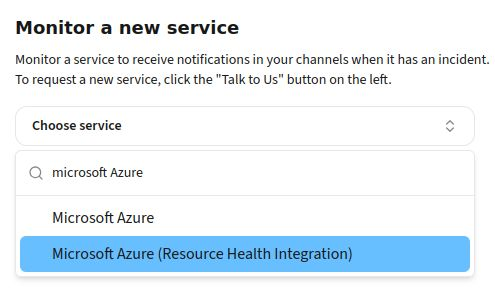
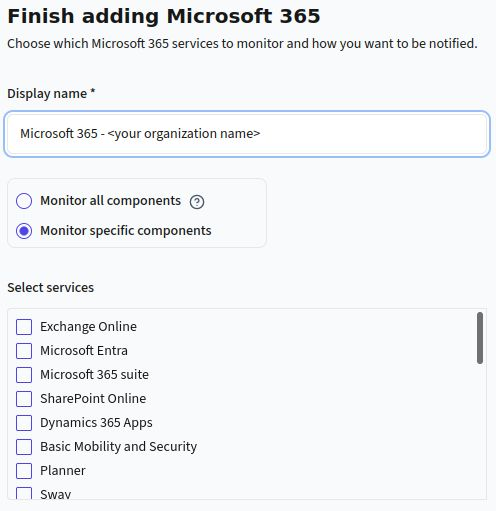
The integration uses Microsoft's standard APIs and authentication mechanisms. The connection is read-only - meaning IncidentHub has only read access to your service health data. The advantage of these integrations is that you can:
- Monitor your Microsoft 365 and Azure services in one place alongside your other SaaS/Cloud dependencies.
- Get real-time alerts for your Microsoft 365 and Azure services, and only the ones that affect your business.
- Track historical uptime data for your Microsoft 365 and Azure services.
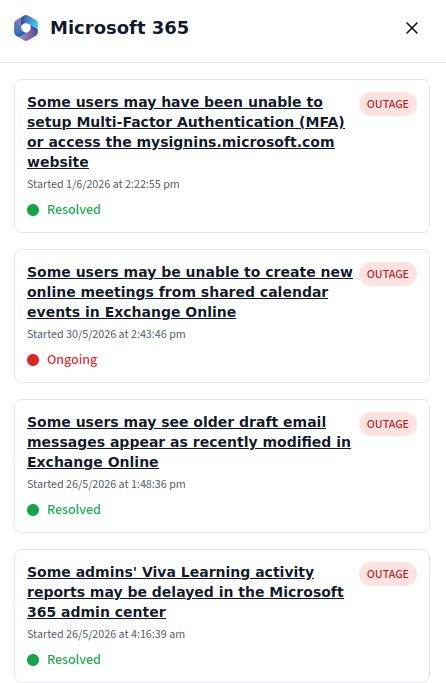
Azure and Microsoft 365 join Infor Cloudsuite in our list of private status ingestion for enterprise customers on IncidentHub's Business plan.
The Business plan's other features include:
- Integration with 4 ticketing systems - Zendesk, Freshdesk, BoldDesk, Atlassian Jira Service Management
- Whitelabeled public status page - which lets you remove the IncidentHub branding and point your custom domain to it
- Multiple Teams support with upto 20 Teams
Simpler Alert Configuration UI
Previously, you could turn off both outages and maintenance (where applicable) alerts for a service. This was too complex for several reasons:
- Unchecking maintenance was sometimes interpreted as "I am not interested in maintenance for this service" - which has a broader meaning than just alerts in your channels. It was also interpreted as "I don't want to see any maintenance related stuff anywhere" - in alerts, in the status page, in the incident timeline, and so on.
- Because of #1 (checkbox's result reflects everywhere - which actually is perfectly in line with IncidentHub's filtering philosophy), the ability to turn off both outages and maintenance did not make sense anymore. If somebody turned off both, why have the service in your list at all?
The UI is now simplified in that you can choose to turn off maintenance related information completely, not just in alerts. The option to turn off outages is no longer there. The maintenance option is turned off by default.
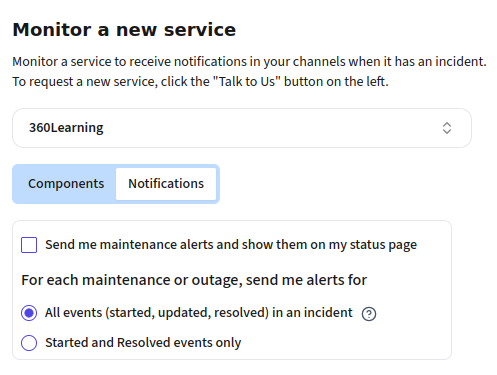
Unchecking this turns off:
- Maintenance alerts
- Maintenance related updates in the availability dashboard and the incident timelines
- Maintenance related badges in the status page
- Upcoming maintenance widget in the public status page
- Upcoming maintenance widget in the dashboard
This setting remains per-service.
Disable your Public Status Page
If you are on an IncidentHub paid plan, the public status page is available by default. It is also enabled - so anybody can access it if they have the URL. You can add a password to it if your plan supports it.
You can now turn off the status page completely if you don't want anybody accessing it. A typical use case is when you are pushing alerts to an external tool like Microsoft Teams or Slack, and you prefer to stay on top of outages there as it fits into your workflow.
This setting is at the top of your status page configuration page.
A Better Status Page Header
This is a small change in the header layout of the status page. The company name and title are bigger, and the logo + company name and page title are now side by side instead of vertically stacked. The side-by-side layout makes better use of the available space, and the larger font size makes the company name and title more prominent. This is automatically applied to all your status pages.
Check out the IncidentHub demo status page to see the new layout in action.
New Vendors
We've added support for more vendors including Broadcom, Runframe, Mosyle, Google AI Studio, Square, MagicSchool and many more. This brings up the total number of supported vendors to 1070+.
Keep watching this space for more updates to IncidentHub.
IncidentHub is not affiliated with any of the services and vendors mentioned in this article. All the logos and company names are trademarks or registered trademarks of their respective holders
This article was first published on the IncidentHub blog.