Product Update - May 2026


What's New in IncidentHub in May 2026?
IncidentHub's latest product updates include a new Business plan with Teams support, early outage detection v1, and more integrations with ticketing systems. The public status now includes a disable feature. As before, many features are driven by feedback, and I am grateful to all our customers who have shared their feedback with us.

- What's New in IncidentHub in May 2026?
- Business Plan with Teams
- Early Outage Detection
- Atlassian Jira Service Management Integration
- Public Status Page Improvements
- More Vendors and Performance Improvements
- Website
Business Plan with Teams
IncidentHub's Business plan - meant for enterprise customers - is now generally available. It includes Teams support with upto 20 Teams, unlimited users, upto 300 services, and support for all our integrations.
The Business plan's other features include:
- Private status page ingestion
- Integration with 4 ticketing systems - Zendesk, Freshdesk, BoldDesk, Atlassian Jira Service Management
- Whitelabeled public status page - which lets you remove the IncidentHub branding and point your custom domain to it
A Closer Look at Teams
An IncidentHub Team behaves the same way as a standalone IncidentHub account but within the same login/account boundaries. If you have a Business plan account, you can create up to 20 Teams. Each Team has its own set of
- Monitored services
- Alert configuration - component filters, lifecycle filters, outage/maintenance toggle
- Notification channels
- Availability dashboard
- Public status page and configuration
Monitored service configurations in one Team do not affect another Team even if they monitor the same services. E.g. Team A can monitor Amazon Web Services EC2 in us-east-1 and Team B can monitor Amazon Web Services EC2 in us-central-1 in the same IncidentHub account.
Typical use cases for Teams are:
- Separate Teams in your organization who monitor different groups of services, and have different notification channels - e.g. Platform Engineering, Security, Data Infrastructure, etc. In this case, do a one-to-one mapping for your organization's teams to IncidentHub Teams. Some Teams can opt for just the status page, and some for alerts, leaving it upto them to decide.
- When you wish to route different groups of service alerts to different channels. E.g. send alerts for services critical to your business to PagerDuty, and non-critical services to Slack. In this case, create one Team for each group and add the services you need in each. Set up PagerDuty in the first and Slack in the second.
- Managed Service Providers (MSPs) who monitor services for their clients and need to keep track of each client's technology stack independent of others.
Early Outage Detection
Vendors don't always update their status pages the moment something goes wrong. Vendor delays in updating status pages reflect their internal incident response process where they are still investigating the scope of the outage. These delays vary across vendors.
Before vendors update status pages, there are other signals that can be used to detect possible outages including but not limited to community reports, synthetic monitoring, and social media mentions.
Community reports are one of the first signals we are incorporating in IncidentHub to augment the official status page data.
Crowdsourced data (like community reports) do not replace status page data but augment them. These user reports can serve as early warning signals. If you notice service degradation or unavailability in your monitored services, you can now submit a report in IncidentHub:
- Go to the IncidentHub page for the service (e.g. Cloudflare).
- Click on "Report an Incident" and fill in the details, and submit.
What Community Reports Do
Right now user reports are submitted and collected. IncidentHub's detection layer - which will be rolled out soon - is being built on top of these signals. We released user report collection as v1 as the foundation for the detection engine. Integration into the detection engine and alerts is coming soon.
A snapshot of user reports during the recent Railway outage:
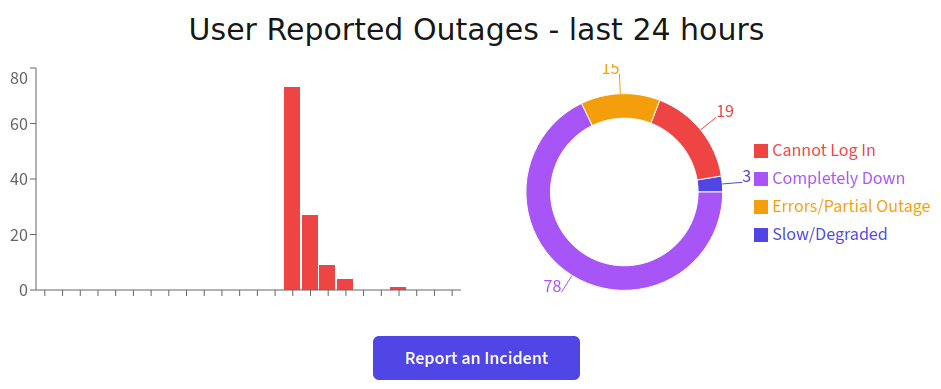
No personal data is collected including the IP address - all reports are anonymous.
What Community Reports Are Not
It is important to understand what community reports are not. They are not a replacement for status page monitoring. Status pages for outage monitoring remain the authoritative sources of information since they are managed by vendors directly. They also have structured, parseable data that can be consumed by automation tools. They remain the contractually significant source for tracking SLAs and planned maintenance schedules.
Atlassian Jira Service Management Integration
Adding to our basket of ticketing system integrations which included Zendesk, BoldDesk, and Freshdesk, we now support Atlassian Jira Service Management too.
Ticketing systems notifications for third-party vendor outages help your customer facing teams to stay on top of incidents and provide timely updates to your customers without giving in to noise.
As with other ticketing system integrations, IncidentHub sends only the start alert for any outage irrespective of your other notification settings (start/end/updates). You can fine-tune other IncidentHub alerts settings for each service in your IncidentHub account.
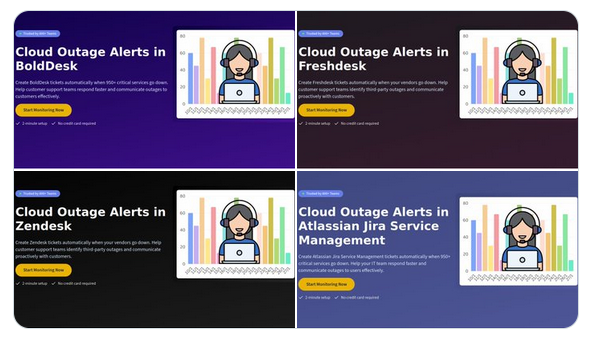
This is available as part of the Business plan.
Public Status Page Improvements
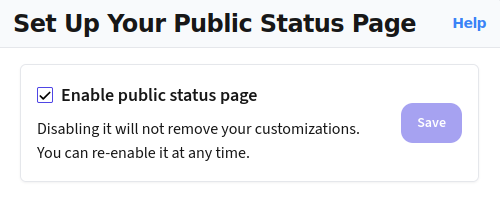
The public status page can now be disabled completely if you are not using it, or don't want it accessed by anyone. Typical cases where you might want to do this are:
- You are pushing alerts to an external tool like Microsoft Teams or Slack, and you prefer to stay on top of outages there as it fits into your workflow.
- You use webhooks to integrate IncidentHub alerts with a custom internal system or dashboard, and the status page is not needed.
More Vendors and Performance Improvements
We've added support for more vendors inlcuding SurveyMonkey, Microsoft 365 (Consumer), Xero, One NZ, eWay-CRM, University of Stirling, Apple (New Zealand), MYOB, Wasabi, Voyager NZ, splose, and Backblaze. This brings up the total number of supported vendors to 950+.
To support the growing number of services, we have improved the performance of the parsing engine so that it can keep up without adding more CPU load to our servers.
Website
Last but not the least, the IncidentHub website now makes it easier to find details about our integrations and features.
Each integration has a dedicated page - Microsoft Teams, Slack, PagerDuty, and 7 more. You can find them on the Integrations menu at the top of the website.
The features list on IncidentHub's website has also been updated to reflect the new features that we have rolled out, including private status page ingestion, real-time alerts, and multiple teams.
Keep watching this space for more updates to IncidentHub.
IncidentHub is not affiliated with any of the services and vendors mentioned in this article. All the logos and company names are trademarks or registered trademarks of their respective holders
This article was first published on the IncidentHub blog.